Apex Vape Apex Vape

2026 Top Vape Pens How to Unlock a One Button Vape Pen?

Time:2026-11-27 Author:Mason
0%

Modern vape pens often use a single button to control power, heating, and basic settings. That simple design can feel confusing when the device stops responding. A small indicator light may blink, or the screen may stay dark, even when the battery seems charged. The right steps depend on the model, so a quick guess is not always reliable.

How to unlock a vape pen with one button? Many devices use a specific sequence of quick presses, but the timing and number can vary. Check the user manual or manufacturer’s support page before trying a sequence. Keep the pen away from children, and use it only if you are an adult where permitted. Do not force the button or open the device. If it feels unusually hot, looks damaged, or has a swollen battery, stop using it and contact the manufacturer. Safety matters more than getting it working immediately.

This guide explains common lock indicators, careful button-press checks, and simple troubleshooting for popular one-button designs in 2026. It also covers charging and storage basics, since low power or a loose connection can look like a lock. Tiny details matter. A light that flashes once is different from one that blinks repeatedly. These clues can help, though they do not replace model-specific instructions. Some advice online sounds confident but may not fit your device. Take a moment to verify it.
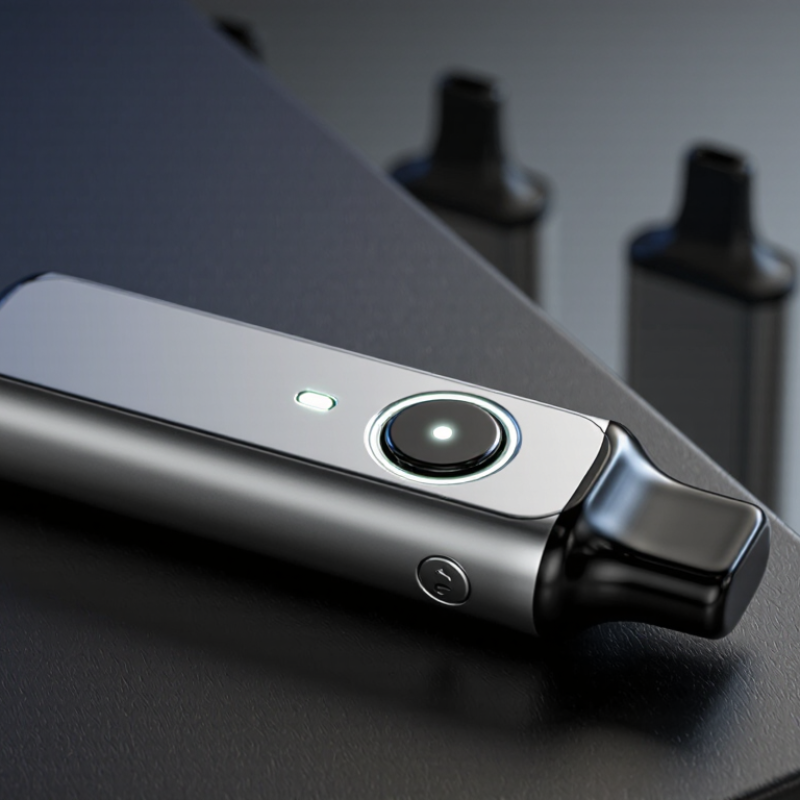
2026 Top Vape Pens How to Unlock a One Button Vape Pen?

How One-Button Vape Pen Locks Work

How One-Button Vape Pen Locks Work

A one-button vape pen usually uses a click pattern to switch between active and locked modes. The button sends a signal to a small control circuit, which then allows or blocks heating. Many models use several quick clicks, but the exact pattern varies. Check the device manual instead of assuming every pen works the same way. A brief light flash may confirm the change. No light could mean the device is locked, low on charge, or not responding. That pause matters.

Tips: Keep the button uncovered in a pocket or bag only when the pen is locked. Use the manual’s timing instructions, and press deliberately rather than holding the button down. Do not force it.

If the expected light or response does not appear, stop and inspect the device for visible damage or moisture. Let it dry if the exterior is damp, and do not attempt to open the casing. A worn button can also make clicks hard to register; that can be frustrating. If the lock behavior remains unclear, contact the seller or manufacturer for model-specific guidance. Before charging or storing the pen, follow its instructions and keep it away from heat and children.

Identify Your Vape Pen Model and Lock Type

A one-button vape pen may use a five-click lock, a timed click pattern, or a button-and-inhale sensor. Do not assume the sequence. The World Health Organization estimated about 100 million people used e-cigarettes worldwide in 2024, reflecting a broad range of device designs. That figure does not identify a universal lock standard. Check the pen’s model number on its base, packaging, or instruction card, then match it to the manufacturer’s manual. A tiny model code can matter more than the pen’s shape.

Look for signs of the lock type before trying anything: a blinking light after a button press, a brief screen message, or a switch near the charging port. Some models lock after several rapid presses; others have a physical slider or no user lock at all. Follow the exact instructions for that model. If the device is hot, swollen, cracked, or behaves unexpectedly, stop pressing the button and seek the manufacturer’s guidance. Guessing can make a small problem worse.

Tips: Count clicks slowly and keep the pen upright on a clear surface. Check that the button is not stuck. Don’t force a switch or probe the charging port. If the model remains unclear, pause and verify it first; honestly, that extra minute is less frustrating than trial and error.

2026 Top Vape Pens: How to Unlock a One-Button Vape Pen? — Identify Your Vape Pen Model and Lock Type

Device Type How to Identify It Common Lock Type Typical Unlock Method Important Notes
Button-activated, 510-thread battery A slim battery with one button and a threaded connector for a separate cartridge. Electronic on/off lock Many models use five quick button clicks to turn on or off. Click timing and the number of clicks vary by model. Check the device instructions before trying a click sequence. Confirm the cartridge is attached securely without overtightening.
Single-button variable-voltage pen A button-operated battery that may show its setting with colored lights or a small display. Electronic lock, plus a separate setting control Some models use a quick multi-click sequence to power on; others use a different sequence to change voltage. Follow the model-specific instructions. Do not assume that a voltage-control sequence also unlocks the device. Use only settings recommended for the attached cartridge.
Button-operated pod device A compact battery with a removable or magnetic pod; the pod may contain the coil or cartridge. Button lock, auto-lock, or screen/menu lock Look for an on-screen lock icon or indicator light. Use the instructions for that exact device to unlock it; some models require a multi-click action. Keep the pod and contacts clean and dry. Do not force a pod into place or use a damaged pod.
Draw-activated pen or pod device No firing button is present; the device activates when the user draws through the mouthpiece. Airflow lock, transport lock, or no user lock Check for a sliding switch, cap, or protective plug. If none is present, consult the manual rather than trying button sequences. Do not insert objects into the airflow path. A device without a button cannot be unlocked by clicking a firing button.
Device with a physical slider or twist control A small switch, rotating collar, or marked lock position is visible on the body. Mechanical lock Move the switch or collar to the marked open or unlocked position, if the device instructions confirm that control. Use gentle pressure only. If the control is stuck, do not pry it or use tools.
Button device that does not respond The indicator does not light, or the device remains inactive after the documented unlock action. Possible low battery, connection issue, or fault—not necessarily a lock Check the charge level and inspect the connector or pod contacts for debris. Follow the manufacturer’s charging instructions. Stop using a device that is unusually hot, swollen, leaking, or visibly damaged. Do not charge it unattended or with an incompatible charger.

Important: Locking and unlocking sequences are not standardized across vape pens. Identify the exact device model and check its user manual before trying a button sequence. Keep the device away from children and pets, and switch it off or lock it when not in use.

Follow the Manufacturer’s Unlocking Sequence

A one-button vape pen may lock to prevent accidental activation in a pocket or bag. The unlocking sequence is model-specific, so check the printed guide or the manufacturer’s official support page before pressing the button. Some devices use a quick series of clicks, while others require a different timing pattern. Do not assume every pen works the same way.

Pause there.

Set the pen on a dry, stable surface and keep the mouthpiece pointed away from your face. Follow the stated number and pace of button presses exactly, then look for the indicator light or display response described in the guide. A blink can mean different things on different devices. Do not guess. If the pen stays locked, wait briefly and repeat the documented sequence once, without holding the button down unless instructed. Check that the device is charged and that its parts are fitted as directed. If it becomes unusually warm, looks damaged, or still will not respond, stop using it and contact the manufacturer’s support team. Instructions can be easy to misread; taking a moment to verify them is safer than trying random combinations.

Check the Device’s Light or Display for Confirmation

When unlocking a one-button vape pen, watch the indicator rather than guessing from the button alone. Many devices use a sequence of quick clicks or a brief button hold, but the exact method varies. Check the printed manual for the correct action. Then look for a clear change in the light or display.

A steady light, a short flash pattern, or an open-lock symbol may indicate that the controls are unlocked. Some screens show a small lock icon disappearing. Others provide only a blink. There is no universal color code, so do not assume that one color means the same thing across devices. Pause and check the manual if the signal is unclear. Small details matter.

If the light keeps blinking or the display still shows a lock, release the button and wait a few seconds before trying again. Avoid repeated rapid presses; they can make the signal harder to interpret. I find this step easy to rush, especially when the indicator is dim. Move to a well-lit spot and inspect the screen closely. If the device feels unusually hot, looks damaged, or gives no reliable confirmation, stop using it and contact the seller or manufacturer for guidance.

2026 Top Vape Pens: How to Unlock a One-Button Vape Pen?

Check the Device’s Light or Display for Confirmation

Follow the instructions for your specific device. After its prescribed unlock action, check the indicator light or display for a status change, then confirm the controls respond as described in the manual. The chart numbers show checklist order only—not measured timings or universal device specifications.

Troubleshoot Safely if the Pen Remains Locked

2026 Top Vape Pens: How to Unlock a One-Button Vape Pen?

A locked one-button vape pen can seem faulty, but the lock may be an intentional safety feature. Many devices unlock with several quick button presses, often three or five. The correct sequence depends on the model, so check its manual rather than repeatedly guessing. Watch the indicator light; its color or blink pattern may signal the device’s status. If the manual is unavailable, look for instructions from the device manufacturer.

Tips: Use a gentle, deliberate press. Confirm the battery has charge, and check that the mouthpiece and charging port are dry and clear. Don’t force the button, pry open the casing, or try to bypass the lock. Small details matter.

If the pen stays locked, turn it off if possible and let it rest at room temperature. A very hot, swollen, leaking, or visibly damaged device should not be charged or used. Contact the manufacturer or a qualified retailer for model-specific help. It is tempting to assume a longer press will fix everything, but that can make troubleshooting less clear. Stop if the device behaves unusually, and follow the manual’s safety instructions.

FAQS

What does the lock do on a one-button pen?

It blocks the heating function until the device is unlocked. A small control circuit responds to the button.

How can I unlock the pen?

Many models use several quick presses, often three or five. The exact pattern varies, so check the manual. Don’t guess repeatedly.

What does a flashing light mean?

A brief flash may confirm a mode change. Light colors and blink patterns differ between models.

What if there is no light?

The pen may be locked, low on charge, or not responding. Check the manual and battery status. That pause matters.

Should I hold the button down if it does not unlock?

No. Press gently and deliberately, following the manual’s timing instructions. Do not force it.

What should I check if the button seems unresponsive?

Look for visible damage or moisture. Check that the mouthpiece and charging port are dry and clear. Do not open the casing.

Can I charge a pen that looks damaged or swollen?

No. Do not charge or use a hot, swollen, leaking, or visibly damaged device. Contact a qualified retailer or the manufacturer.

What should I do if the lock behavior remains unclear?

Stop guessing and seek model-specific guidance. A worn button can make clicks hard to register, which is frustrating—and easy to misread.

Conclusion

This guide explains how one-button vape pen locks work and why a device may lock to prevent accidental activation during storage or handling. Before trying to unlock it, identify the pen’s model and check its manual or on-device instructions, since button sequences and lock types can vary. If you are wondering, “How to unlock a vape pen with one button?”, use only the sequence specified for your device, such as a particular pattern of button presses, and avoid guessing or forcing the controls.

After following the instructions, check the indicator light or display for a clear sign that the pen is unlocked. If it remains locked, stop and consult the manual, check that the device is charged, and inspect it for visible damage or moisture. Do not open, modify, or bypass its safety features. If the controls still do not respond, discontinue use and contact the device’s support service or a qualified repair professional.

Mason

Mason

Mason is a seasoned marketing professional with a deep expertise in the company's offerings and a passion for driving brand awareness. With a strong background in digital marketing strategies, he has an innate ability to connect with diverse audiences and effectively communicate product benefits.......